
- 其他连接:
- 参考文献:
一、iframe
1.1 什么是iframe
- 在
HTML中有三种结构特征:树结构、层次结构、框结构。iframe正是框结构中的一员。iframe元素会创建包含另外一个文档的内联框架(即行内框架)。- 简单地说,我们可以通过
ifram在自己的网页展示其他的网页。
可以把需要的文本放置在
<iframe>和</iframe>之间,这样就可以应对无法理解iframe的浏览器。
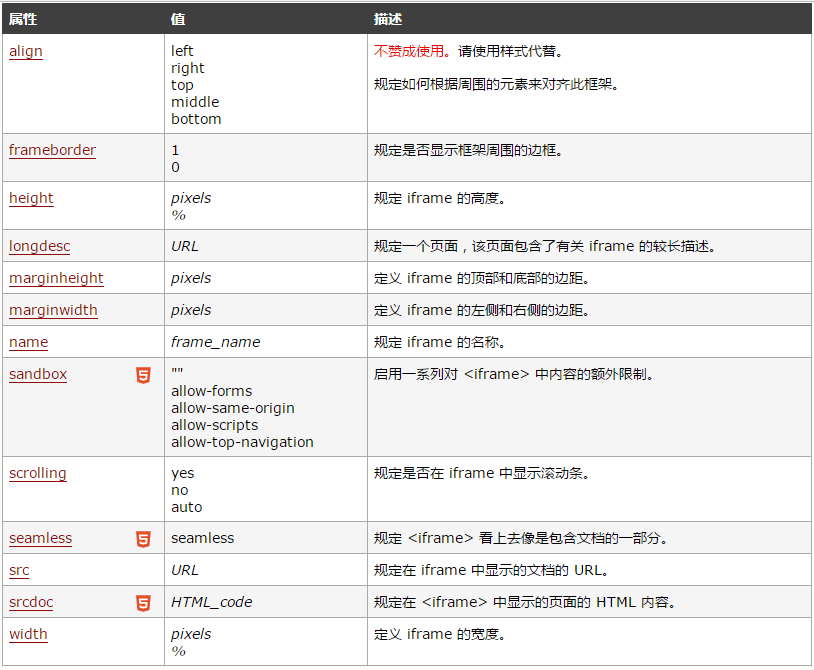
iframe的属性,如下图:
二、window.name的传输技术
- 先看一下以下js代码(假设当前的网址为:
http://www.jmazm.com/):
// 1. 设置window.name
window.name = 'jmazm';
// 2. 读取window.name
console.log(window.name); // 'jmazm'
// 3. 跳转页面
location.href = 'http://www.cnblogs.com/Jm-jing/';
// 4. 再次读取window.name
console.log(window.name); // 'jmazm'
- 也尝试过刷新页面以及强制刷新页面,读取的
window.name的值依然为jmazm。
- 总结:只要设置了
window.name,它的值永远不变,无论是刷新或者跳转页面,除非你手动更改页面
三、iframe和window.name的结合跨域
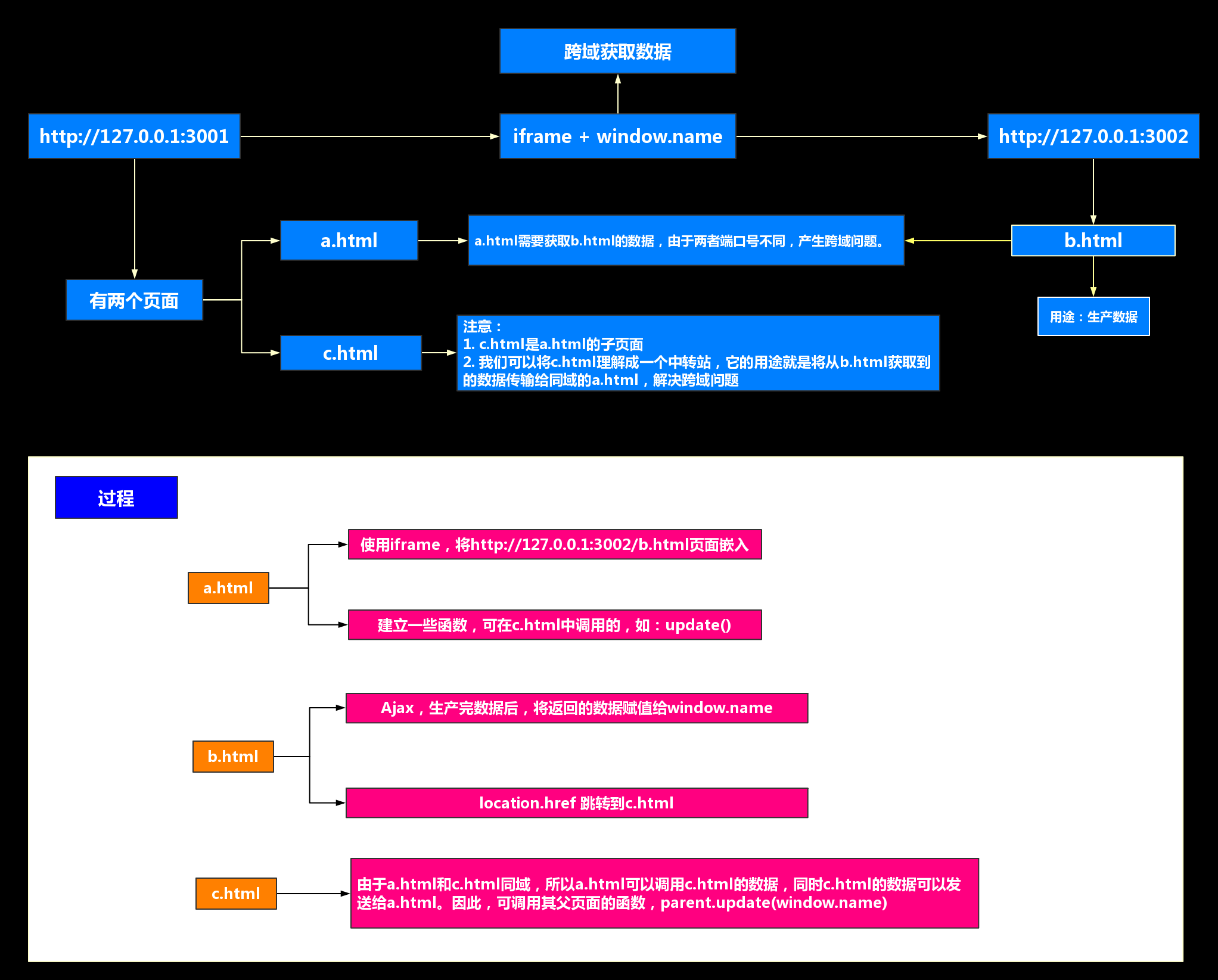
- 简略过程如下图
- 最简单的
iframe和window.name的结合跨域的操作我们需要的“工具”如下:
- 两个不同的域(可随意搭建,这里只是举个例子):
http://127.0.0.1:3001、http://127.0.0.1:3002http://127.0.0.1:3001下需要两个页面:a.html、c.htmlhttp://127.0.0.1:3002下需要一个页面:b.html
- 接下来再讲讲具体的步骤以及举个例子:
http://127.0.0.1:3001/a.html:
- 有一个目标:
a.html需要获取http://127.0.0.1:3002/b.html的数据,但是存在一个严重的问题:它俩由于端口号不同导致不同域,因此无法跨域获取数据。
- 解决问题的方法:使用
iframe,将http://127.0.0.1:3002/b.html页面嵌入- 可以额外添加一些函数,用来给与它同域的页面调用,例如:update()
<!DOCTYPE html>
<html lang="en">
<head>
    <meta charset="UTF-8">
    <title>a.html</title>
</head>
<body>
<ul class="data-list"></ul>
<iframe src="http://localhost:3002/b.html" frameborder="0"></iframe>
<script>
    /**
     * 正常情况,我们是通过ajax发送请求拿数据,但是由于存在跨域问题,直接通过ajax是无法将数据请求回来
    /*
    const xhr = new XMLHttpRequest()
    xhr.onreadystatechange = () => {
        if (xhr.readyState === 4) {
          if (xhr.status === 200) {
            console.log(xhr.responseText)
          }
        }
    }
    xhr.open("get", "http://localhost:3002/data.json", true)
    xhr.send(null)
    */

    /**
     * 将拿回来的数据渲染到页面上
     * @param data
     */
    function update (data) {
      const dataList = document.querySelector('.data-list')
      let str = ''

      data = JSON.parse(data).data
      for (let item of data) {
        str += `<li>id = ${item.id}, name = ${item.name}</li>`
      }
      dataList.innerHTML = str
    }
</script>
</body>
</html>
http://127.0.0.1:3002/b.html:
- 用途:生产数据。
- 过程:生产数据成功后,将返回的数据复制给
window.name,并使用location.name跳转到http://127.0.0.1:3001/c.html
- 由于
window.name强大存储数据的能力,让c.html成功跨域拿到了b.html的数据
<!DOCTYPE html>
<html lang="en">
<head>
    <meta charset="UTF-8">
    <title>b.html</title>
</head>
<body>
<script>
  const xhr = new XMLHttpRequest()
  xhr.onreadystatechange = () => {
    if (xhr.readyState === 4) {
      if (xhr.status === 200) {
        // 将拿回来的数据存储到 window.name
        window.name = xhr.responseText

        // 并跳转路由到 c.html页面
        location.href = 'http://localhost:3001/c.html'
      }
    }
  }
  xhr.open("get", "http://localhost:3002/data.json", true)
  xhr.send(null)
</script>
</body>
</html>
http://127.0.0.1:3001/c.html:
- 由于
a.html和c.html同域,所以a.html可以调用c.html的数据,同时c.html的数据可以发送给a.html。因此,在c.html可调用其父页面的函数,并传进window.name,如:parent.update(window.name)
<!DOCTYPE html>
<html lang="en">
<head>
  <meta charset="UTF-8">
  <meta name="viewport" content="width=device-width, initial-scale=1.0">
  <meta http-equiv="X-UA-Compatible" content="ie=edge">
  <title>传递数据</title>
</head>
<body>
  <script>
    parent.update(window.name);
  </script>
</body>
</html>